

Introduction
Purpose
This document summarizes the details of the integration between the Saville Assessment Oasys Platform and the Applicant Tracking System using SOAP authenticated Hr-XML.
This document is a draft and the information contained is subject to change on further reviews.
Oasys Overview
Oasys is an on-demand highly configurable online application service designed to deploy and manage the Saville Assessment range of assessment products. It uses a Software as a service (SaaS) model running from the Microsoft Azure cloud within EU regions which provides a highly secure and scalable environment with inbuilt resilience and high availability. The system allows for 24/7 access to assessments and reports.
Scope
This documentation includes:
- The integration interfaces available on the Saville Assessment Oasys system.
- Provides a testbed for creating Assessment Order Requests.
- Provides the scale references returned from our main standard products.
- Platform configuration options.
- Description of error codes provided.
- Covers Frequently Asked Questions.
Definitions, Acronyms, and Abbreviations
Definitions, acronyms, and abbreviations used within this document are:
| Keyword | Description |
|---|---|
| Assessment | An online series of questions administered to a participant, this can include psychometric, aptitude and immersive assessments. |
| Participant / Candidate | A person sitting an activity. |
| Client | A person or company that sets up evaluation(s) for participant(s). |
| GUID | Globally Unique Identifier used as identifiers in the integration for Client Codes, Assessments, Reports, and comparison Groups. |
| AOR | Assessment Order Request |
| ATS | Applicant tracking system |
| UAT | User Acceptence Testing |
Web Service URLs
The client specific web service URLs will be provided in a separate document outlining the client specific details.
XML Specification
The xml should validate against the HR-XML Schema. All identifiers are supplied by Saville Assessment in the client specific documentation unless stated otherwise.
Note: Where it currently returns Saville Consulting this will be changing to Saville Assessment soon, please do not validate against this.
Authentication
Sample SOAP header:
<soap:Header>
<AuthHeader xmlns="http://ws.sc-oasys.com/">
<Username> UserCompanyABC </Username>
<Password> Bf$"79Yv@Wjsy&f! </Password>
</AuthHeader>
</soap:Header>
The Saville HrXml 2.5 Web Service uses SOAP Header Authentication. Web Service users must send a username and password in the SOAP Header provided by Saville Assessment. These credentials are different for each customer system being accessed.
Please note the values should be XML encoded.
Ref: https://scintegration-test.uat-oasys.com/ws/Integration/SavilleHrXml/Assessment.asmx
Process Flow Overview
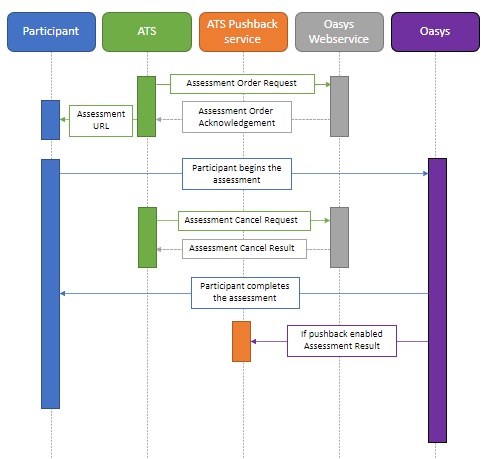
The overall interaction between the Oasys system and the applicant tracking system is described below:
ATS system sends the Saville Assessment Oasys system an assessment order request message which contains the participant details, assessment, reports / scores and comparison.
The Saville Assessment Oasys system returns an assessment order acknowledgement message which contains the URL to be delivered to the participant that enables access to the assessment. This also includes a receipt id that uniquely identifies this request.
The ATS system manages participant redirection to the assessment URL for assessment completion.
The ATS system can cancel (reset) any assessment that has been started via an assessment cancel request message. Reset functionality can be dictated on a per client basis.
The Saville Assessment Oasys system will automatically pushback the assessment results to the ATS system when the assessment has been completed.
The Saville Assessment Oasys system returns an assessment result message which contains the report(s)
Integration APIs
Assessment Order Request
Assessment Order Request Example XML
<AssessmentOrderRequest xmlns:xsi="http://www.w3.org/2001/XMLSchema-instance"
        xsi:schemaLocation="http://ns.hr-xml.org/2007-04-15 ../HRXML200704/HR-XML-2_5/StandAlone/AssessmentOrderRequest.xsd"
        xmlns="http://ns.hr-xml.org/2007-04-15">
        <ClientId idOwner="Saville Assessment">
                <IdValue name="ClientCode">00000000-0000-0000-0000-000000000001</IdValue>
        </ClientId>
        <PackageId idOwner="Saville Assessment">
                <IdValue name="Instrument">00000000-0000-0000-0000-000000000002</IdValue>
                <IdValue name="XmlScores">00000000-0000-0000-0000-000000000003</IdValue>
                <IdValue name="PdfReport">00000000-0000-0000-0000-000000000003</IdValue>
        </PackageId>
        <ProviderId idOwner="Customer Inc">
                <IdValue>Saville Assessment</IdValue>
        </ProviderId>
        <ComparisonGroupId>
                <IdValue name="Professional and Graduates">00000000-0000-0000-0000-000000000005</IdValue>
        </ComparisonGroupId>
        <ClientOrderId>
                <IdValue name="AssessmentCompleteReturnUrl">https://www.savilleassessment.com</IdValue>
                <IdValue name="AssessmentPushbackUrl">https://www.savilleassessment.com/Results.svc</IdValue>
        </ClientOrderId>
        <AssessmentRequester>Romuald Restout</AssessmentRequester>
        <AssessmentSubject>
                <SubjectId idOwner="Customer Inc">
                        <IdValue name="CandidateID">00000000-0000-0000-0000-000000000006</IdValue>
                </SubjectId>
                <PersonName>
                        <LegalName>Doe</LegalName>
                        <GivenName>John</GivenName>
                </PersonName>
                <ContactMethod>
                        <InternetEmailAddress>john.doe@domain.com</InternetEmailAddress>
                </ContactMethod>
        </AssessmentSubject>
</AssessmentOrderRequest>
Purpose
The assessment order request message is used to transmit the information required to create an assessment on the Saville Assessment Oasys system for a participant.
Assessment Order Request Root Element
| Tag | Description |
|---|---|
| <ClientId> | The idOwner attribute should be set to "Saville Assessment". This should contain one child element, the ClientCode set to a unique GUID supplied in the client documentation. |
| <PackageId> |
The idOwner attribute should be set to "Saville Assessment". This must contain a child element requesting one assessment:
Standard GUIDs can be obtained in the test bed section of this document, for custom assessments or reports these GUID'S will be sent in the client documentation. The relationship is one assessment to many reports / scores. In the Assessment Order Request (AOR), you can request: PDF Reports only, Score Sets Only or both Reports and score sets. |
| <ProviderId> | The idOwner attribute should be set to the client name. This should contain one <IdValue> with the value set to "Saville Assessment". |
| <ComparisonGroupId> | Will contain one <IdValue> child element. The name attribute is a string indicating the comparison group that will be used for the scoring of the selected assessment. The value of this element will be set to the GUID of the comparison group. |
| <ClientOrderId> | This is required and can be empty or multiple <IdValue> child elements. These can be used for the following configurable options |
| <AssessmentRequester> | The value of this element should be set to the name of the individual who is requesting the assessment. |
AssessmentSubject Element
Should contain the <SubjectId>, <PersonName> and <ContactMethod> child elements defined below that will contain information about the person who will be the subject of the assessment.
There is an option not to send any Personal Identifiable Information in the request, but to only send candidate identifiers. This will affect the PDF reports and the candidate support that Saville Assessment can offer.
| Tag | Description |
|---|---|
| <SubjectId> | The idOwner attribute should be set to the client name. Should contain one <IdValue> child element with the name attribute set to “CandidateID”. The value is a unique string up to 50 characters identifying the participant (assigned by the client). This value should be unique within the client (ClientCode). |
| <PersonName> | Should contain one <GivenName> child element whose value should be set to the first name of the participant. Should contain one <LegalName> child element whose value should be set to the last name of the participant. Both values should be a string with a maximum of 256 characters. |
| <ContactMethod> | Should contain one <InternetEmailAddress> child element whose value should be set to the participants email address. This is a string with a maximum of 256 characters. |
There are additional optional configuration options that can be included in the Assessment Order Request
Assessment Order Acknowledgement
Assessment Order Acknowledgement Example XML
<AssessmentOrderAcknowledgement xmlns:xsi="http://www.w3.org/2001/XMLSchema-instance"
 xsi:schemaLocation="http://ns.hr-xml.org/2007-04-15 http://ns.hr-xml.org/2_5/HR-XML-2_5/StandAlone/AssessmentOrderAcknowledgement.xsd"
 xmlns="http://ns.hr-xml.org/2007-04-15">
    <ClientId idOwner="Saville Consulting">
        <IdValue name="ClientCode">00000000-0000-0000-0000-000000000001</IdValue>
    </ClientId>
    <ProviderId idOwner="Customer Inc">
        <IdValue>Saville Consulting</IdValue>
    </ProviderId>
    <ReceiptId idOwner="Saville Consulting">
        <IdValue> 00000000-0000-0000-0000-000000000004 </IdValue>
    </ReceiptId>
    <ClientOrderId idOwner="Customer Inc">
                <IdValue name="AssessmentCompleteReturnUrl">https://www.savilleassessment.com</IdValue>
                <IdValue name="AssessmentPushbackUrl">https://www.savilleassessment.com/Results.svc</IdValue>
    </ClientOrderId>
    <AccessPoint>
        <Use>business</Use>
        <InternetWebAddress>https://go.sc-oasys.com/Redirect/guid</InternetWebAddress>
        <Description>URL for subject to access assessment.</Description>
    </AccessPoint>
    <AssessmentStatus>
        <Status>Acknowledged</Status>
        <Details>The assessment order has been processed.  Please have the subject access the provided URL.</Details>
        <StatusDate>2021-04-04</StatusDate>
    </AssessmentStatus>
</AssessmentOrderAcknowledgement>
Purpose
The assessment order acknowledgement message is used to transmit the result of the assessment order request. This will typically contain an assessment URL and a ReceiptID or suitable error message and details.
Assessment Order Request Root Element
| Tag | Description |
|---|---|
| <ClientId> | The idOwner attribute is currently set to "Saville Consulting", but will be changing to "Saville Assessment". Will contain one <IdValue> element with the name attribute value equal to "ClientCode" and the value of the <IdValue> element set to the client id. |
| <ProviderId> | The idOwner attribute will be set to the client name supplied by the client. Will contain one <IdValue> whose value will be set to "Saville Consulting", but will be changing to "Saville Assessment" |
| <ReceiptId> | This element will be present if the assessment order request was processed successfully. Will contain exactly one <IdValue> child element with the idOwner attribute set to “Saville Consulting” but will be changing to "Saville Assessment". The value of this element should be set to the unique identifier for the assessment order request |
| <ClientOrderId> | Will contain the <IdValue> child elements of the <ClientOrderId> element received in the assessment order request. |
| <AccessPoint> | This element will be present if the assessment order request was processed successfully. Will contain one <Use> child element whose value will be set to “business”. Will contain one <InternetWebAddress> child element whose value will be set to the URL that should be used to access the assessment. Will contain one <Description> child element whose value will be set to a description of the purpose of the access point. |
| <AssessmentStatus> | Will contain the <Status>, <Details> and <StatusDate> child elements defined below that will contain information on the status of the assessment order request process. |
| <Status> | This element’s value will be set to “Acknowledged” if the assessment order request was processed successfully otherwise the value will be set to “Error”. |
| <Details> | The element's value will be set to a description of the assessment order request status. |
| <StatusDate> | The date the assessment request order was processed. Format: yyyy-mm-dd |
Assessment Cancel Request
Assessment Cancel Request Example XML
<AssessmentCancelRequest xmlns:xsi="http://www.w3.org/2001/XMLSchema-instance"
    xsi:schemaLocation="http://ns.hr-xml.org/2007-04-15 http://ns.hr-xml.org/2_5/HR-XML-2_5/StandAlone/AssessmentCancelRequest.xsd"
    xmlns="http://ns.hr-xml.org/2007-04-15">
    <ClientId idOwner="Saville Consulting">
        <IdValue name="ClientCode">00000000-0000-0000-0000-000000000001</IdValue>
    </ClientId>
    <ProviderId idOwner="Customer Inc">
        <IdValue>Saville Assessment</IdValue>
    </ProviderId>
    <ClientOrderId>
        <IdValue name="CustomClientTag1">ValueTag1</IdValue>
        <IdValue name="CustomClientTag2">ValueTag2</IdValue>
    </ClientOrderId>
    <ReceiptId idOwner="Saville Assessment">
        <IdValue>00000000-0000-0000-0000-000000000004</IdValue>
    </ReceiptId>
</AssessmentCancelRequest>
Purpose
The assessment cancel request message is used to transmit the information required to reset an assessment on the Oasys system for a participant. The rules regarding which assessments can be reset will be determined on a per client basis.
| Tag | Description |
|---|---|
| <ClientId> | The idOwner attribute should be set to "Saville Assessment". Should contain one <IdValue> element with the name attribute value equal to "ClientCode" and the value of the <IdValue> element set to the client id. (Supplied in the document) |
| <ProviderId> | The idOwner attribute should be set to the client name supplied by the client. Should contain one <IdValue> element whose value should be set to "Saville Assessment". |
| <ClientOrderId> | Can contain multiple <IdValue> child elements. The name attribute for these elements should be set to the name for the unique identifier (assigned by the client) the client can use to identify the order. The value of the elements should be set to the corresponding identifier value (assigned by the client). |
| <ReceiptId> | Will contain exactly one <IdValue> child element with the idOwner attribute set to “Saville Assessment”. The value of this element should be set to the unique identifier for the assessment order request as returned in the assessment order acknowledgement. |
Assessment Cancel Result
Assessment Cancel Result Example XML
<AssessmentCancelResult
    xsi:schemaLocation="http://ns.hr-xml.org/2_5/HR-XML-2_5/StandAlone/AssessmentCancelResult.xsd"
    xmlns="http://ns.hr-xml.org/2007-04-15" xmlns:xsi="http://www.w3.org/2001/XMLSchema-instance"
    xmlns:dc="http://purl.org/dc/elements/1.1/">
    <ClientId idOwner="Saville Consulting">
        <IdValue name="ClientCode">00000000-0000-0000-0000-000000000001</IdValue>
    </ClientId>
    <ProviderId idOwner="SavilleConsulting">
        <IdValue>Saville Consulting</IdValue>
    </ProviderId>
    <ClientOrderId>
        <IdValue name="CustomClientTag1">ValueTag1</IdValue>
        <IdValue name="CustomClientTag2">ValueTag2</IdValue>
    </ClientOrderId>
    <AssessmentStatus>
        <Status>Cancelled</Status>
        <StatusDate>2020-06-02</StatusDate>
    </AssessmentStatus>
</AssessmentCancelResult>
Purpose
The assessment cancel result message shows the status of an assessment cancel request message.
| Tag | Description |
|---|---|
| <ClientId> | The idOwner attribute should be set to "Saville Consulting". Should contain one <IdValue> element with the name attribute value equal to "ClientCode" and the value of the <IdValue> element set to the client id. |
| <ProviderId> | The idOwner attribute should be set to the client name supplied by the client. Should contain one <IdValue> element whose value should be set to "Saville Consulting". |
| <ClientOrderId> | Can contain multiple <IdValue> child elements. The name attribute for these elements should be set to the name for the unique identifier (assigned by the client) the client can use to identify the order. The value of the elements should be set to the corresponding identifier value (assigned by the client). |
| <AssessmentStatus> | Will contain the <Status>, <Details> and <StatusDate> child elements defined below that will contain information on the status of the assessment order request process. |
| <Status> | This element’s value will be set to “Acknowledged” if the assessment order request was processed successfully otherwise the value will be set to “Error”. |
| <Details> | The element's value will be set to a description of the assessment order request status. |
| <StatusDate> | The date the assessment request order was processed. Format: yyyy-mm-dd |
Assessment Result
Purpose
The assessment result message is used to transmit the result of an assessment on the SC system for a participant. Reports and scores are only available if the assessment has been completed.
Assessment Result Example XML
<AssessmentResult xmlns:xsi="http://www.w3.org/2001/XMLSchema-instance"
    xsi:schemaLocation="http://ns.hr-xml.org/2007-04-15 http://ns.hr-xml.org/2_5/HR-XML-2_5/StandAlone/AssessmentResult.xsd"
    xmlns:dc="http://purl.org/dc/elements/1.1/" xmlns="http://ns.hr-xml.org/2007-04-15">
    <ClientId idOwner="Saville Consulting">
        <IdValue name="ClientCode">00000000-0000-0000-0000-000000000001</IdValue>
    </ClientId>
    <ProviderId idOwner="Saville Consulting">
        <IdValue>Saville Consulting</IdValue>
    </ProviderId>
    <ClientOrderId idOwner="Customer Inc">
        <IdValue name="CustomClientTag1">ValueTag1</IdValue>
        <IdValue name="CustomClientTag2">ValueTag2</IdValue>
    </ClientOrderId>
    <ReceiptId idOwner="Saville Consulting">
        <IdValue>00000000-0000-0000-0000-000000000002</IdValue>
    </ReceiptId>
    <Results xml:lang="en-US">
        <Profile> Saville Consulting Report 1</Profile>
        <SupportingMaterials>
            <Id idOwner="Saville Consulting">
                <IdValue name="ReportId">00000000-0000-0000-0000-000000000006</IdValue>
            </Id>
            <EffectiveDate>
                <StartDate>2007-07-15</StartDate>
                <EndDate>2008-03-08</EndDate>
            </EffectiveDate>
            <dc:title>Assessment Detailed Narrative Report</dc:title>
            <dc:format>application/pdf</dc:format>
            <EmbeddedData>
                <EncodedContent>base64encodedstring</EncodedContent>
                <OriginalFileName>filename.pdf</OriginalFileName>
            </EmbeddedData>
        </SupportingMaterials>
        <DetailResult>
            <Description>Reference001Description</Description>
            <CompetencyAssessed>
                <CompetencyId idOwner="Saville Consulting">
                    <IdValue name="Reference">Reference001</IdValue>
                    <IdValue name="Type">Normative</IdValue>
                </CompetencyId>
            </CompetencyAssessed>
            <Score type="sten">5</Score>
        </DetailResult>
        <DetailResult>
            <Description>Reference002Description</Description>
            <CompetencyAssessed>
                <CompetencyId idOwner="Saville Consulting">
                    <IdValue name="Reference"> Reference002</IdValue>
                    <IdValue name="Type">Ipsative</IdValue>
                </CompetencyId>
            </CompetencyAssessed>
            <Score type="sten">5</Score>
        </DetailResult>
    </Results>
    <AssessmentStatus>
        <Status>Completed</Status>
        <Details>Completed</Details>
        <StatusDate>2007-07-15</StatusDate>
    </AssessmentStatus>
    <UserArea>
        <TestTimingAdjustment>
            <PercentageIncrease>10</PercentageIncrease>
            <Comment>Time adjusted due to dyslexia</Comment>
        </TestTimingAdjustment>
    </UserArea>
</AssessmentResult>
| Tag | Description |
|---|---|
| <ClientId> | The idOwner attribute will be set to "Saville Consulting". Will contain one <IdValue> element with the name attribute value equal to "ClientCode" and the value of the <IdValue> element set to the client id. |
| <ProviderId> | The idOwner attribute will be set to the client name supplied by the client. Will contain one <IdValue> whose value will be set to "Saville Consulting". |
| <ClientOrderId> | Will contain the <IdValue> child elements of the <ClientOrderId> elements from the assessment order request. |
| <Results> | Will contain the results for packages where the type attribute of the <IdValue> element was set to “XmlScores”. (“PdfReport” type packages are contained in the <UserArea> element) The xml:lang attribute value will be set to the code of the culture the results have been generated for. Will contain one <SupportingMaterials> (defined below) child element which will contain the report id, effective date report title information Can contain multiple <DetailResult> (defined later) child elements which will contain the scores. |
| <SupportingMaterials> | Will contain the <Id>, <EffectiveDate>, <dc:title>, and <dc:format> child elements defined below that will contain information about the results. |
| <Id> | The idOwner attribute will be set to "Saville Consulting". |
| <EffectiveDate> | Will contain one <StartDate> and one <EndDate> child element. The value of those elements will be dates in the yyyy-mm-dd format. |
| <dc:title> | The value of this element will be set to the name of the report. |
| <dc:format> | The value of this element will be set to "text/xml" if xml scores requested or "application/pdf" if report requested. |
| <EmbeddedData> | Will contain base64 encoded PDF data if PDF report is requested. |
| <EncodedContent> | Contains the base64 encoded PDF string for the report. |
| <OriginalFilename> | Contains the original filename of the PDF report. |
| <DetailResult> | Will contain one <CompetencyAssessed> and one <Score> child element. |
| <Description> | Will contain a text description for the competency scored. |
| <CompetencyAssessed> | Will contain one <CompetencyId> child element which will define the scale that the score is for. |
| <CompetencyId> | Will contain two <IdValue> child elements. One of the child elements will have the name attribute set to “Reference” and its value will be the scale reference. The other child element will have its name attribute set to “Type” and its value will be one of the following: “Raw”, “Normative”, “Ipsative“, “Nipsative”, “TalentNip”, “MotiveNip”. |
| <Score> | The type attribute will be set to one of the following values: “percentile”, “raw score”, “sten”, “t-score”, “z-score”. This is a subset of the enumeration values defined in the Assessment Result HR-XML Schema. |
| <AssessmentStatus> | Will contain the <Status>, <Details> and <StatusDate> child elements defined below that will contain information on the status of the assessment. |
| <Status> | This element’s value will be set to "Completed" if the assessment has successfully been compeleted otherwise the value will be set to “Error”. |
| <Details> | The element's value will be set to a description of the assessment order request status. |
| <StatusDate> | The date the assessment request order was processed. Format: yyyy-mm-dd |
| <UserArea> | Will be present if any test timing adjustment has been applied. This only applies to some instruments / assessment |
| <TestTimingAdjustment> | Root node for test timing adjustment |
| <PercentageIncrease> | Node for storing the percentage increase in time to apply to an assessment |
| <Comments> | Node for storing a comment explaining why a test timing adjustment has been applied. |
Configuration Options
Pushback
A pushback will contain all the reports and scores that were requested in the AOR. If the pushback fails for any reason a retry mechanism is in place to provide resilience.
Client settings
A pushback URL can be set at the client level and configured in Oasys. To add or edit these settings please email integration.support@savilleassessment.com:
<ClientOrderId>
        <IdValue name="AssessmentPushbackUrl">https://www.savilleassessment.com/Results.svc</IdValue>
</ClientOrderId>
Pushback URL per Assessment Order Request
Oasys has a URL configured that all results are posted to. This configured value can be overridden within an Assessment Order Request. To do this, an additional IdValue element needs to be included within the ClientOrderId. In this case, the name attribute should be AssessmentPushbackUrl and the value of the element is the URL to post the results to. The xml fragment below demonstrates a simple example that will post the results to a URL www.savilleassessment.com with an endpoint Results.svc:
Resets
The reset functionality within Oasys can be achieved via
- Sending an Assessment Cancel Request
- Sending a duplicate Assessment Order Request
- Using the Oasys platform
Return URL
<ClientOrderId>
                <IdValue name="AssessmentCompleteReturnUrl">
                        https://www.savilleassessment.com/12345678/
                </IdValue>
</ClientOrderId>
Return URL per Assessment Order Request
Oasys has a URL configured that all candidates are returned to. This configured value can be overridden within an Assessment Order Request. To do this, an additional IdValue element needs to be included within the ClientOrderId. In this case, the name attribute should be AssessmentCompleteReturnUrl and the value of the element is the URL to return to. The xml fragment below demonstrates a simple example that will return the candidate to a URL www.savilleassessment.com with 12345678 included in the path:
The return URL also supports the replacement of placeholders within the URL. Multiple placeholders are supported. The list of supported placeholders is below:
| {ClientAssignedID} | The candidate ID provided for the ATS |
| {ReceiptId} | The receipt ID that was generated for the Assessment Order Request. |
| {CultureCode} | The culture code of the candidate |
| {<ClientOrderId Name>} | Any name that was passed within the IdValue of the ClientOrderId node. In the example below, the placeholder would be {Company} and then this was be replaced with ACME when the candidate is returned after the assessment has been completed. |
Data Separation
<ClientOrderId>
                <IdValue name="Company">ACME</IdValue>
</ClientOrderId>
Candidate data separation via project discriminators
There is sometimes a need for candidates to be separated within Oasys into different projects by the use of a project discriminator. By default, Oasys will put all candidates for an instrument into a single project. This can be overridden within an Assessment Order Request so that candidates go into different projects even though they are all completing the same instrument. To do this, an additional IdValue element needs to be included within the ClientOrderId. Both the name attribute and element value can be any string identifier but the name attribute will need to be consistent across Assessment Order Request’s so that Oasys can extract the value. In the example below the name is Company and the value is ACME. This will cause this candidate to go into a project with a discriminator of ACME.
If there is a second company, in this case called SavilleAssessment, this would look like the fragment below. This would need a separate project creating with a discriminator of SavilleAssessment.
 <ClientOrderId>
                <IdValue name="Company">SavilleAssessment</IdValue>
</ClientOrderId>
Before using this feature, please speak to Integration Support to have the feature enabled (it is disabled by default) and to make sure it will work for the scenarios you have in mind. It is also to ensure that projects are available for the discriminators you require as if there are no projects available and this feature is enabled, the Assessment Order Request will fail.
Custom Tags
The client can send additional information in the Client Order ID node of the Assessment Order Request. These Nodes will be returned in the Assessment Order Acknowledgement
<ClientOrderId>
        <IdValue name="CustomClientTag1">ValueTag1</IdValue>
        <IdValue name="CustomClientTag2">ValueTag2</IdValue>
</ClientOrderId>
Status requests
<ClientOrderId>
                <IdValue name="ReturnAssessmentResults">false</IdValue>
</ClientOrderId>
Retrieve the status of the assessment without retrieving the PDF
There is an option within the assessment status request to suppress the return of assessment results. You can include a key/value pair of ReturnAssessmentResults and false to suppress the results and just get a status returned.
Languages
<AssessmentLanguage>en-GB</AssessmentLanguage>
<ResultLanguage>en-US</ResultLanguage>
Assessment Language
By default a page is displayed to the participant prior to the completion of each assessment, that offers the participant a choice of the available languages on the project prior to completion of the assessment.
This is an option "Culture Select" that is controlled at project level and can be switched off upon request, the available list of languages can also be controlled at project level.
An AssessmentLanguage node can be sent in the Assessment Order Request, this will determine the language the Privacy Policy is displayed in. If the "Culture Select" flag is switched off for the project it will also force the participant to complete the assessment in this language.
Result Language
The result language node, determines the culture of the PDF reports are returned in
Time Adjustments
   <UserArea>
        <TestTimingAdjustment>
            <PercentageIncrease>10</PercentageIncrease>
            <Comment>Time increased due to dyslexia</Comment>
        </TestTimingAdjustment>
    </UserArea>
Aptitude assessments are timed, a time adjustment can be added to the assessment to meet accessibility requirements. A percentage increase and reason, must be included in the Assessment Order Request for the time adjustment to be applied.
Frequently Asked Questions
Test / UAT environment
A test / UAT environment will be provided during periods of active development.
The UAT environment is not subject to the same SLA's as the production environment.
There must be no live data entered onto this environment.
IP restrictions
We will no longer be providing our own list of IP addresses for whitelisting. The integration must be able to support dynamic IPs.
Charging
Sending the Cost Center via the integration so it appears in the usage spreadsheet?
Using the project discriminator functionality, you can pass through the Cost Center so it appears in the project name.
<ClientOrderId>
        <IdValue name="CostCenter">Cost Center</IdValue>
</ClientOrderId>
The projects will be created as : ‘SavilleHrXml – {{Company}} – {{Instrument Name}}’,
On the Oasys platform configuration options : • “Create project if not found” should be set to True. • “Project Discriminators” Should be set to CostCenter Please notify integration.support@savilleAssessment.com that you require these options configuring.
iFrames
iFrames are not supported via Oasys
Error Codes
Upon assessment completion, the participant is redirected back to a configurable URL by the Oasys system. If an error occurs during the assessment the participant will be redirected to the same URL with an error parameter added to the query string. The possible values of the error parameter are listed below:
| 0 | UnknownError |
| 1 | InternalError |
| 2 | InvalidAssessmentInstanceID |
| 3 | InvalidCultureCode |
| 11 | BrowserAvailableAreaError |
| 12 | ScreenResolutionError |
| 13 | FlashVersionError |
| 14 | AlreadyStarted |
| 15 | Aborted |
| 16 | ResponseUploadError |
| 18 | SharedObjectError |
| 20 | DelayedResponseUpload |
| 21 | FontNotInstalled |
| 22 | JavaScriptDisabled |
| 27 | InactiveSession |
| 34 | Html5LocalStorageError |
| 35 | Html5InlineSVGError |
| 36 | Html5SVGError |
| 37 | Html5SVGClipPathsError |
| 38 | HandheldDevicesNotSupported |
| 39 | ConnectionError |
| 40 | ExitPrivacy |
| 41 | Html5NotEnoughLocalStorage |
Testbed
Create Assessment Order Request
Created Assessment Order Request XML
Hovering over the name of each field will provide you with additional tips.
<AssessmentOrderRequest xmlns:xsi="http://www.w3.org/2001/XMLSchema-instance"
xsi:schemaLocation="http://ns.hr-xml.org/2007-04-15 ../HRXML200704/HR-XML-2_5/StandAlone/AssessmentOrderRequest.xsd"
xmlns="http://ns.hr-xml.org/2007-04-15">
<ClientId idOwner="Saville Consulting">
<IdValue name="ClientCode">00000000-0000-0000-0000-000000000001</IdValue>
</ClientId>
<PackageId idOwner="Saville Consulting">
<IdValue name="Instrument">00000000-0000-0000-0000-000000000002</IdValue>
<IdValue name="XmlScores">00000000-0000-0000-0000-000000000003</IdValue>
<IdValue name="PdfReport">00000000-0000-0000-0000-000000000003</IdValue>
</PackageId>
<ProviderId idOwner="Customer Inc">
<IdValue>Saville Consulting</IdValue>
</ProviderId>
<ComparisonGroupId>
<IdValue name="Professionals & Graduates (2005, IA)">00000000-0000-0000-0000-000000000005</IdValue>
</ComparisonGroupId>
<ClientOrderId>
<IdValue name="CustomClientTag1">ValueTag1</IdValue>
<IdValue name="CustomClientTag2">ValueTag2</IdValue>
<IdValue name="AssessmentPushbackUrl">https://www.savilleassessment.com/Results.svc</IdValue>
<IdValue name="AssessmentCompleteReturnUrl">https://www.savilleassessment.com/12345678/</IdValue>
</ClientOrderId>
<AssessmentRequester>Romuald Restout</AssessmentRequester>
<AssessmentSubject>
<SubjectId idOwner="Customer Inc">
<IdValue name="CandidateID">00000000-0000-0000-0000-000000000006</IdValue>
</SubjectId>
<PersonName>
<LegalName>Doe</LegalName>
<GivenName>John</GivenName>
</PersonName>
<ContactMethod>
<Use>business</Use>
<InternetEmailAddress>john.doe@domain.com</InternetEmailAddress>
</ContactMethod>
</AssessmentSubject>
<AssessmentLanguage>en-GB</AssessmentLanguage>
<ResultLanguage>en-US</ResultLanguage>
<UserArea>
<TestTimingAdjustment>
<PercentageIncrease>10</PercentageIncrease>
<Comment>Time increased due to dyslexia</Comment>
</TestTimingAdjustment>
</UserArea>
</AssessmentOrderRequest>
Returned Assessment Order Acknowledgement XML
<AssessmentOrderAcknowledgement xmlns:xsi="http://www.w3.org/2001/XMLSchema-instance"
 xsi:schemaLocation="http://ns.hr-xml.org/2007-04-15 http://ns.hr-xml.org/2_5/HR-XML-2_5/StandAlone/AssessmentOrderAcknowledgement.xsd"
 xmlns="http://ns.hr-xml.org/2007-04-15">
    <ClientId idOwner="Saville Consulting">
        <IdValue name="ClientCode">00000000-0000-0000-0000-000000000001</IdValue>
    </ClientId>
    <ProviderId idOwner="Customer Inc">
        <IdValue>Saville Consulting</IdValue>
    </ProviderId>
    <ReceiptId idOwner="Saville Consulting">
        <IdValue> 00000000-0000-0000-0000-000000000004 </IdValue>
    </ReceiptId>
    <ClientOrderId idOwner="Customer Inc">
        <IdValue name="CustomClientTag1">ValueTag1</IdValue>
        <IdValue name="CustomClientTag2">ValueTag2</IdValue>
    </ClientOrderId>
    <AccessPoint>
        <Use>business</Use>
        <InternetWebAddress>http://yourclient.sc-oasys.com/login.aspx?querystring</InternetWebAddress>
        <Description>URL for subject to access assessment.</Description>
    </AccessPoint>
    <AssessmentStatus>
        <Status>Acknowledged</Status>
        <Details>The assessment order has been processed.  Please have the subject access the provided URL.</Details>
        <StatusDate>2007-07-07</StatusDate>
    </AssessmentStatus>
</AssessmentOrderAcknowledgement>
Assessment Order Acknowledgement
Once you copy the above Assessment Order Request and send it as a request to our system, you should get an Assessment Order Acknowledgement similar to what you can see on the right containing an 'Acknowledged' message and a link for the candidate to take the assessment.
Scale References
In order to see the available Scale References, you have to pick an Instrument and a specific Report for that instrument from the dropdowns below.
Instrument Name:
Report Name:
Scale References: